Gianni-AI — Family Assistant
Family expenses, managed and categorized by AI: no more spreadsheets to update by hand at the end of every month.
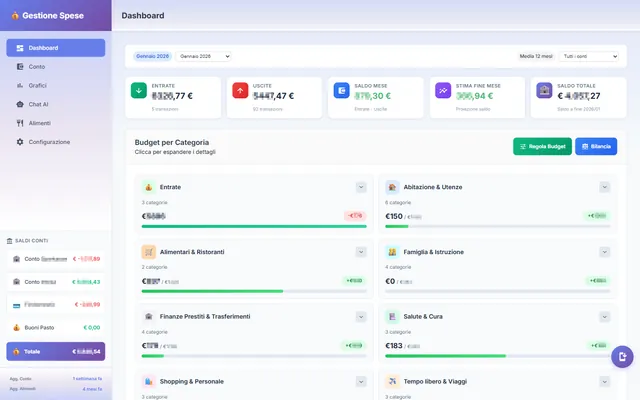
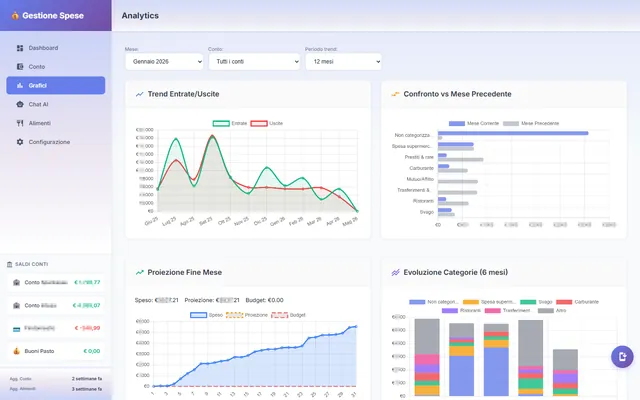
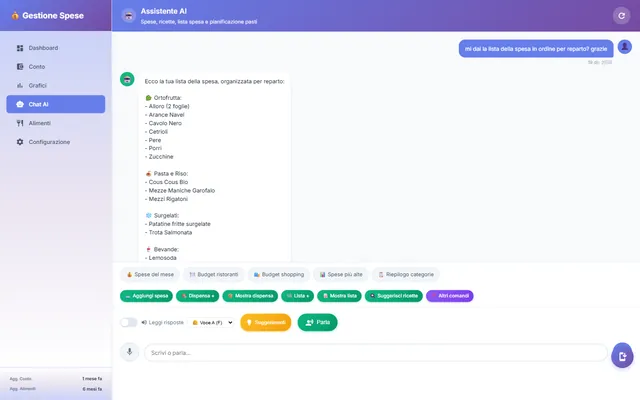
Gianni-AI comes from a very domestic, very tedious problem: keeping track of where a family's money goes. Groceries, bills, Saturday's dinner out, the unexpected trip to the mechanic — dozens of small entries a month, and traditional spreadsheets work beautifully for exactly two weeks, until someone gets tired of updating them. The problem isn't the math, it's the categorizing: deciding, every single time, which box each expense goes in. And that is precisely the effort I wanted to take away from people and hand to the AI.
The gesture: write a sentence, don't fill in a table
In a classic budgeting app, for every expense you have to open a dropdown and pick a category, then another for the payment method, then type the amount in the right field. Gianni-AI flips the gesture: you write the expense the way you'd say it out loud — «55 euros of groceries at Coop», «electricity bill 78» — and the model extracts the amount, understands what it is and assigns it a consistent category. No menus, no required fields: one line of text, and the rest is automatic.
A year of real expenses
Gianni-AI isn't a demo: I've used it with my family for about a year, and it's the only place the household expenses go. In the busy months several hundred transactions pass through it, with groceries as by far the most frequent category — everyday shopping is made of small, repeated amounts, and that is exactly where a spreadsheet gives up first. A year of continuous use is also why things that looked like details on paper — category consistency over time, duplicates, ambiguous phrasing — turned out to be the only ones that really matter.
How it works underneath
The heart of the app is a PHP backend acting as a bridge to Gemini, Google's AI model, called via API. Every entry is sent to the model with a precise request: not «write something about this expense», but «return category, amount and type in a structured format». That is an important difference: asking for a structured answer rather than a discursive one is what lets you store the data cleanly and aggregate it. The answer comes back, is recorded, and the totals update on their own.
The delicate part of a system like this is consistency: if the same expense lands in «Groceries» today and «Shopping» tomorrow, the summaries become useless. That's why the model doesn't invent free categories on every pass but works over a defined set — groceries, bills, restaurant, transport, health, home, clothing, gifts, phone, and so on — alongside the income entries, like salary and other income. The AI interprets natural language; the category structure keeps it all in order.
The most stubborn error, early on, sat right on that boundary: the model mixed up groceries and restaurant. They are neighbouring categories — «30 euros for dinner» can mean the shopping to cook it or the bill at the pizzeria — and getting them wrong systematically distorts the two budget lines a family looks at first. The fix wasn't a cleverer prompt but two things together: a closed category list, with a clear definition of what goes where, and the fact that the more the history of already-categorized expenses grew, the more concrete examples the model had to anchor to. After a few months of real data, categorization became reliable on this kind of ambiguity.
The AI proposes, a human confirms
Gianni never saves anything on its own. Every sentence you write becomes a proposal: Gemini returns category, amount and type, and before the entry lands in the ledger there is a step where you accept or correct it. In the normal flow it's one tap; when needed, you change the category and move on. It's a design choice, not a technical limitation: on data about the household money, the last word stays with a person, and the AI does the boring part — reading the sentence, pulling out the fields — not the deciding.
Some checks, though, are better kept away from the model. The slipperiest edge cases are handled in code, with explicit rules. The typical example: two transactions with the same amount on the same day — it can be a duplicate from a repeated entry, or two distinct expenses that happen to coincide. In that case Gianni doesn't guess: it stops and asks for explicit confirmation, so no expense is counted twice and no real expense is discarded as a duplicate.
Why Gemini Flash
The model behind Gianni is Gemini Flash. The choice is practical: for a narrow task like this — read one line, return three structured fields — you don't need the biggest, most expensive model, you need the one that gives a good answer fast and at almost no cost. Flash has a free tier generous enough to cover a family's use without thinking about it, and low latency, which matters when logging an expense has to be a matter of seconds. If the gesture is slower than typing the amount by hand, the app has already lost.
What you see in the end
The result isn't yet another table to read, but a picture that builds itself: where the family budget really goes, month by month, category by category. The question the app answers is not «how much did I spend» — everyone knows that — but «what does it go on, without me having to file away every receipt». It's the difference between a ledger and an assistant: the first you have to keep yourself, the second works while you live.
Why «Gianni»
The playful name isn't a detail: it says exactly what the app wants to be. Not management software to learn, with its learning curve and its menus, but a member of the family you simply tell what you spent. «Gianni, I filled up the tank, 60 euros» — and Gianni takes care of it. The AI here isn't an extra feature: it's what makes the gesture simple enough to actually be done, every day, instead of being put off to the end of the month and then never.
Under the hood
Gianni-AI is PHP and an API integration with Gemini Flash, no heavy frameworks. Since this is the household's accounts, it's built around privacy: the data stays local, it belongs to a single family, and there is no multi-user dimension or public service to sign up for. The only thing that leaves is the single expense sentence sent to the model to be interpreted; the ledger, the totals and the history stay where they are. The AI steps in only at the moment of categorizing, always with a human confirmation after it, and the checks that can't be got wrong — duplicates, missing amounts — are written in the code, not left to the model. It's one of several projects on the portal where AI isn't there to produce content to display, but to remove a chore — here, the most unwelcome one of running a household.